Do Battery Adapters Ruin Tool Batteries? The Low-Voltage Cutoff Trap Explained

Cheap fifteen dollar battery adapters brick expensive lithium tool packs overnight. Learn where tool brands place low-voltage cutoffs, melting terminal risks, and jump-start tricks.
Table of Contents5 Sections
You spend an afternoon driving heavy lag screws into framing studs using a cheap plastic adapter that lets your red Milwaukee M18 battery slide onto your yellow DeWalt drill. When the tool finally groans and stops spinning, you pop the battery off, slide it onto your factory wall charger, and watch the charger flash a rapid red-and-green error sequence indicating that your $150 lithium-ion battery pack is permanently dead.
Online marketplaces sell thousands of injection-molded and 3D-printed plastic battery adapters for fifteen dollars, promising that you can cross-breed red, yellow, teal, and lime-green tool ecosystems without spending hundreds of dollars on extra batteries.
What those budget adapter listings never reveal is that different tool manufacturers place their electronic protection circuitry in completely different locations. Combining the wrong battery and tool via a passive plastic adapter bypasses your battery’s Low Voltage Cutoff (LVC), allowing the motor to drain the lithium cells below their fatal recovery threshold.
I serviced commercial mobile equipment electronics and analyzed battery failures for decades. In this guide, I map out where the battery brains live across DeWalt, Milwaukee, Makita, and Ryobi, expose the terminal melting dangers of high-draw tools, and provide the field rules for keeping your battery investments alive.
The Mystery of the “Missing” Cutoff: Where Does the Brain Live?
Modern cordless tools run on cylindrical 18650 or 21700 lithium-ion cells wired in series. A standard five-cell 18V or 20V Max pack operates with a nominal charge of 18 volts, charges to 21 volts when full (4.2 volts per cell), and must never discharge below 12.5 volts (2.5 volts per cell).
If a lithium-ion cell discharges below 2.5 volts, copper from the internal electrode plates begins to dissolve into the liquid electrolyte solution. When you subsequently attempt to recharge an over-discharged cell, dissolved copper forms microscopic metal dendrites that short-circuit the internal separator, creating a severe fire hazard.
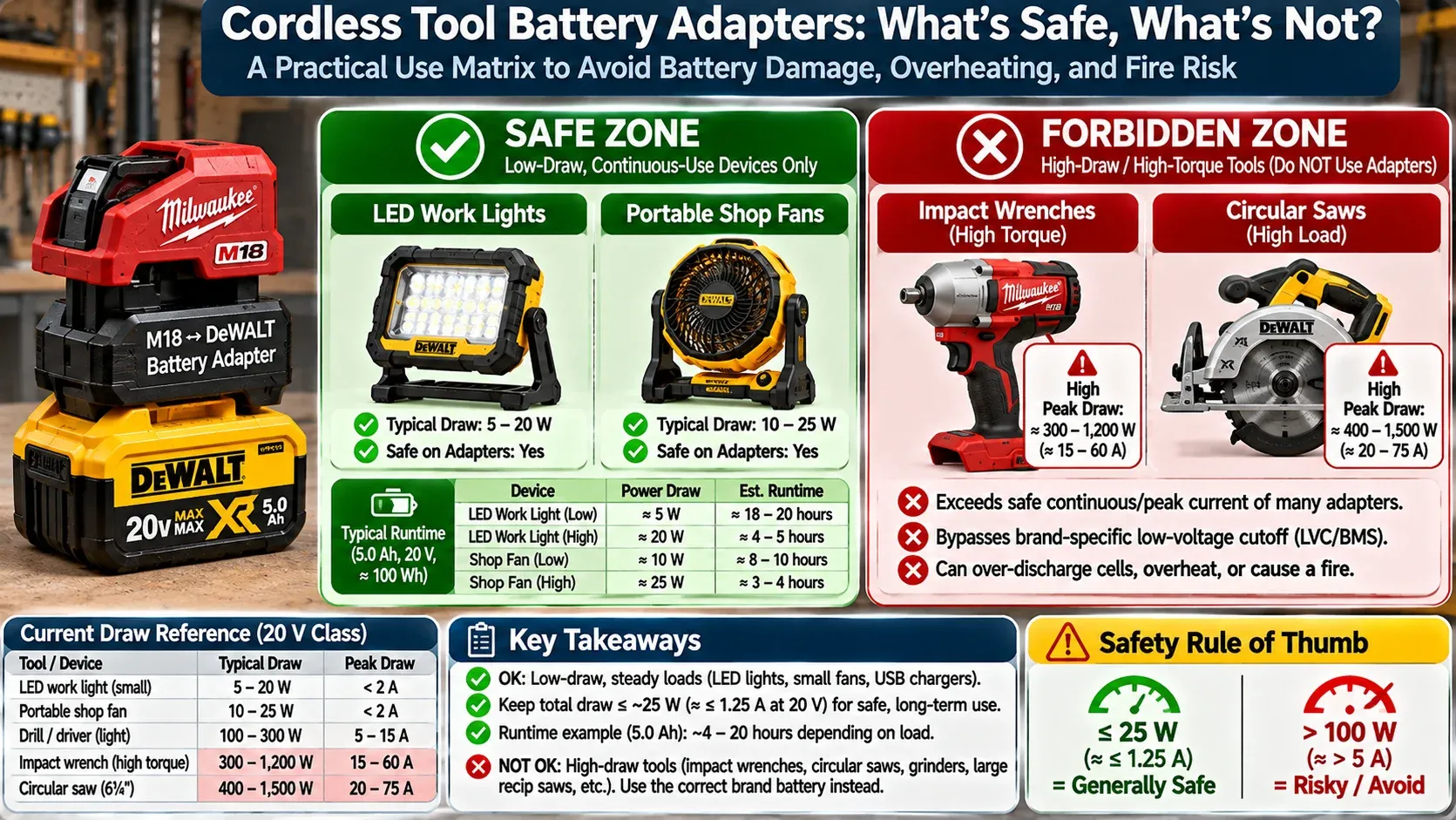
Technical electrical architecture infographic showing Low-Voltage Cutoff (LVC) locations across tool brands, left diagram showing Makita/DeWalt system with LVC brain inside tool body, right diagram showing Milwaukee with onboard BMS in battery pack, center adapter creating an unprotected circuit draining cells past safe 2.
To prevent this fatal failure, manufacturers install a Low Voltage Cutoff (LVC) circuit that cuts power the moment the pack drops near 15 volts (roughly 3.0 volts per cell). However, major brands engineer this safety system using two completely opposing design architectures:
Architecture 1: The Brain Lives in the Battery (DeWalt, Ryobi, Ridgid)
In DeWalt 20V Max and Ryobi ONE+ systems, the battery pack houses its own internal Battery Management System (BMS) equipped with solid-state MOSFET switches. The battery monitors its own cell voltages; when charge drops to the safety limit, the battery shuts its own power terminals off internally, regardless of what tool it powers.
Architecture 2: The Brain Lives in the Tool (Milwaukee M18, Makita LXT)
In Milwaukee M18 and Makita 18V systems, the battery pack houses cell-monitoring sensors but delegates the shut-off switch to the tool handle. The battery communicates with a microprocessor inside the tool; when the battery signals low voltage, the tool motor controller cuts power. The battery itself lacks an internal mechanical switch to disconnect its output terminals.
Here is where cheap adapters create catastrophic failures: when you connect a Milwaukee M18 or Makita battery to a DeWalt or Ryobi tool via a dumb plastic adapter, there is zero communication. The DeWalt tool expects the battery to shut itself down, while the Milwaukee battery waits for the tool to kill the circuit.
Neither component has an active brain in the loop. The tool drains every micro-amp of power out of the pack until cell voltages plummet below two volts, permanently ruining the pack.
Battery Cross-Brand Compatibility Matrix: Identifying the Death Combos
Determine the safety risk of adapting your specific battery brand onto another tool platform.
Using DeWalt 20V Max or Ryobi ONE+ battery on Milwaukee M18 or Makita tools
Using Milwaukee M18 or Makita 18V battery on DeWalt 20V or Ryobi ONE+ tools
Using any adapter on continuous-draw devices (LED work lights, fans, leaf blowers)
The Melting Terminal Hazard: High-Amp Tool Overload
Under Underwriters Laboratories UL 2595 standards for battery-powered tools, OEM battery terminals and internal thermal fuses undergo rigorous endurance testing to prevent runaway heat generation under peak amp loads.
Beyond low-voltage cell death, cheap battery adapters create severe thermal melting hazards when attached to high-demand tools.
A standard cordless compact drill or impact driver draws between ten and fifteen amps of current during light fastening. A cordless 4.5-inch angle grinder, circular saw, or SDS rotary hammer draws thirty to fifty amps under heavy cutting loads.
Factory battery terminals utilize heavy stamped beryllium copper alloy blades engineered to maintain massive spring tension and low electrical resistance under forty-amp loads. Cheap fifteen-dollar adapters use paper-thin stamped brass or nickel-plated steel tabs.
Under high-amperage draws, the electrical resistance across those thin, loose-fitting adapter tabs creates localized thermal hot spots exceeding two hundred degrees Fahrenheit. That heat melts the surrounding ABS plastic casing, welding the adapter prongs directly into your expensive battery terminal block.
The Golden Rules of Using Battery Adapters Safely
Always inspect the contacts for corrosion or moisture before snapping an adapter into place. Check my shop tips on how to keep tools from rusting in a toolbox to protect battery terminals and copper contacts from winter garage humidity.
If you choose to use cross-brand adapters to save money, you must adopt strict workshop operating habits to protect your equipment:
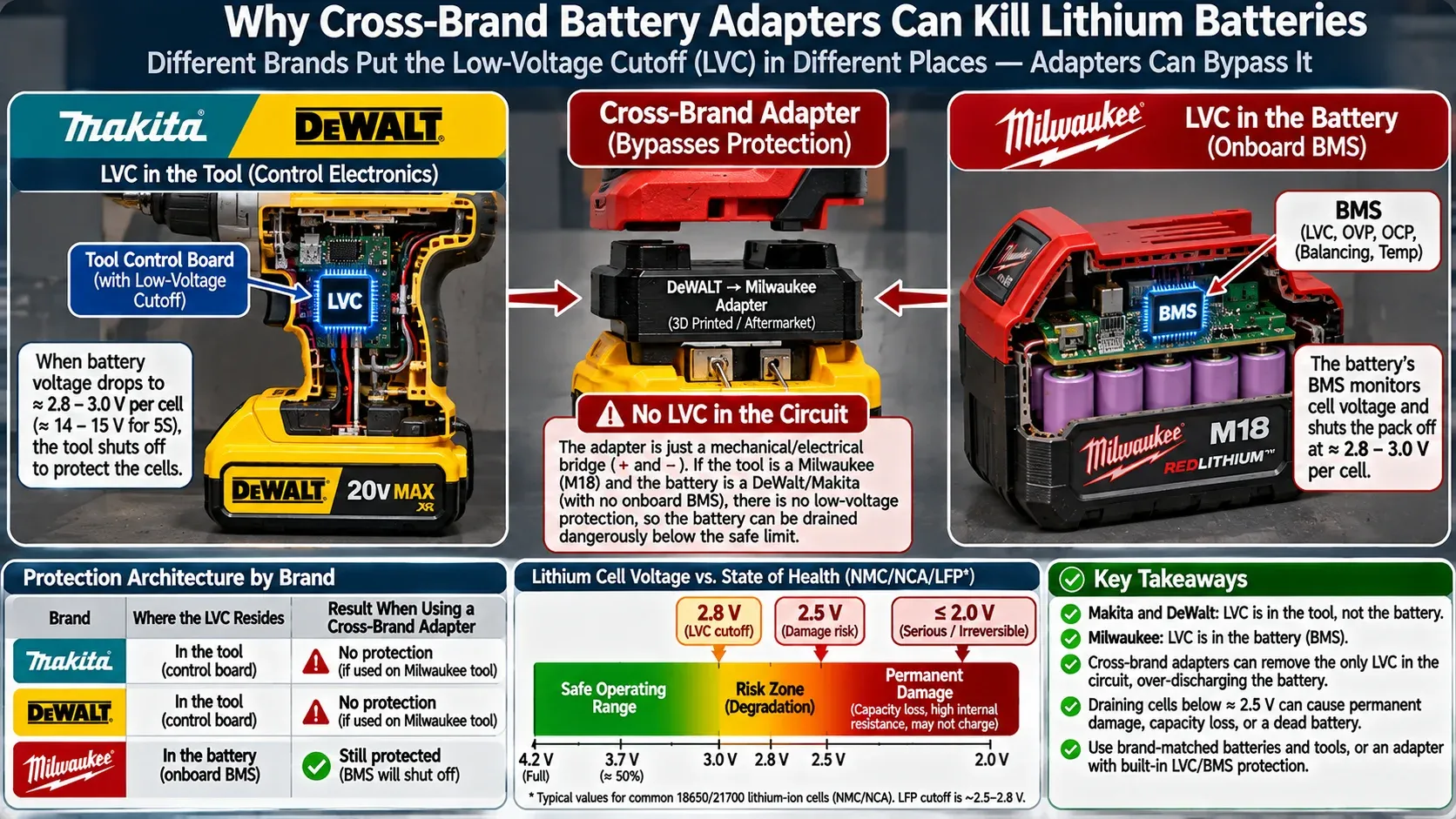
Workshop safety matrix infographic for cordless tool battery adapters, green safe zone showing low-draw LED work lights and small portable shop fans with runtime limits, red forbidden zone showing high-torque impact wrenches and circular saws, clear visual indicators.
Rule 1: Stop Before the Battery Stalls
Never use a battery through an adapter until the tool completely stops running. The moment you detect a slight drop in motor RPM, trigger response, or sound pitch, stop working immediately, remove the battery, and place it on a charger.
Rule 2: Never Store Batteries on Adapters
Many commercial adapters contain internal voltage divider resistors or small diagnostic LED lights that continuously draw a tiny parasitic current (around five to fifteen milliamps). Leaving a battery clicked into an adapter on your workbench for two weeks will slowly drain the pack to zero volts, even with the tool trigger untouched.
Rule 3: Restrict Adapters to Low-Draw Hand Tools
Only use adapters on tools with intermittent, low-amperage duty cycles, such as compact impact drivers, brad nailers, caulking guns, and reciprocating trim saws. Never use an adapter on continuous heavy-load tools like circular saws, grinders, planers, or shop vacuums.
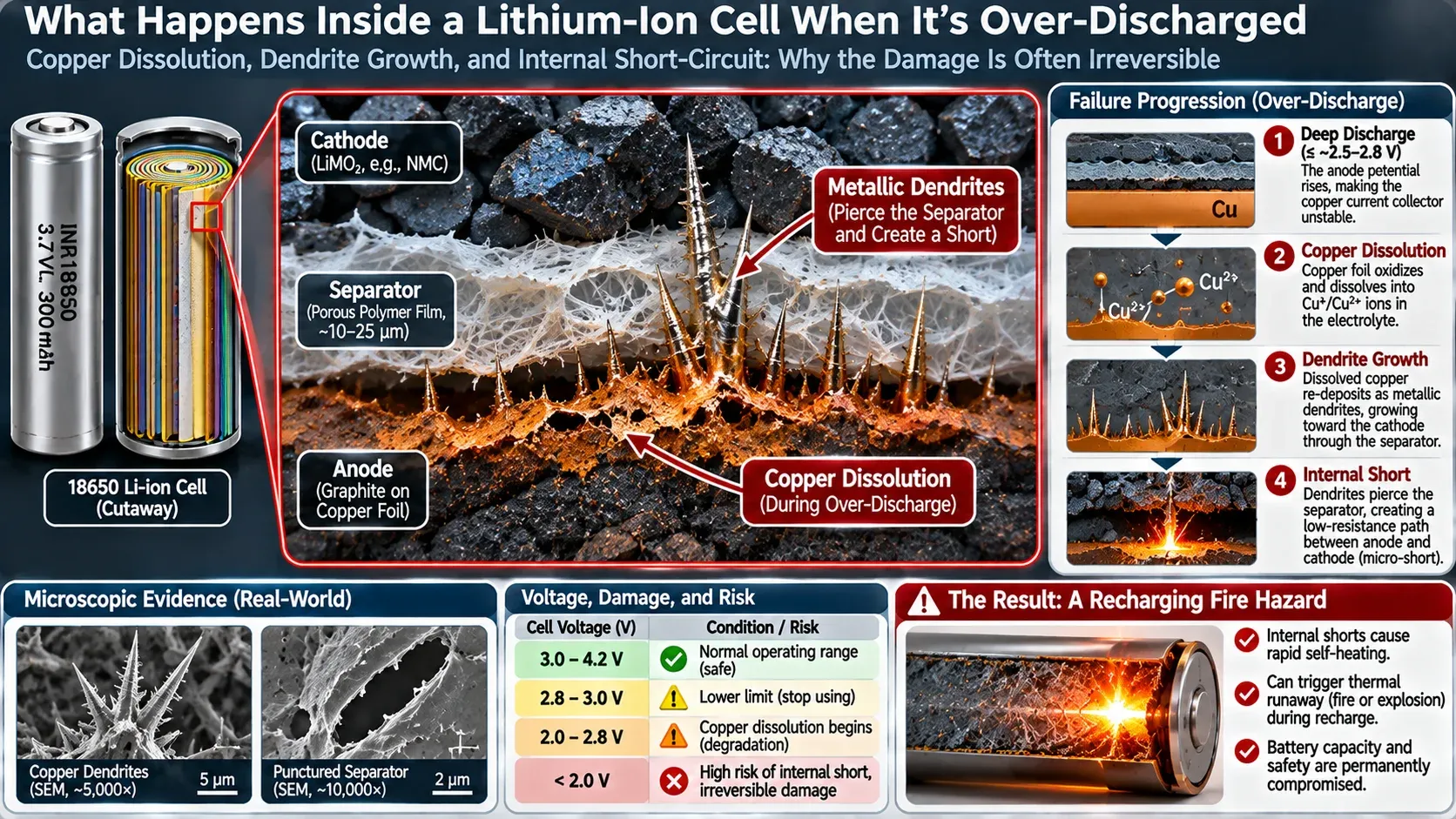
Microscopic cutaway scientific diagram of an over-discharged lithium-ion 18650 cell, showing copper anode dissolution and metallic dendrite shunts piercing the polymer separator film, creating internal micro-shorts and fire hazard on recharge, modern technical graphic.
Can You Revive a “Bricked” Battery? The Jump-Start Trick
When a modern lithium-ion pack drops below twelve volts, the factory smart charger reads the low terminal voltage as a dangerous short circuit and refuses to initiate a charge cycle, flashing an error light.
If the pack was discharged recently and did not sit at zero volts for weeks, you can frequently wake the electronics from sleep mode using a parallel jump-start technique:
First, place a fully charged donor battery of the identical voltage (18V or 20V) beside the bricked battery on a fire-resistant concrete floor.
Second, take two pieces of insulated 14 AWG copper wire and connect the positive terminal of the charged battery to the positive terminal of the dead battery, and connect the negative terminal to the negative terminal. Maintain continuous contact for sixty to ninety seconds.
The charged donor battery will transfer a modest charge into the dead pack, raising its terminal voltage above thirteen volts. Immediately disconnect the wires, check that the pack feels completely cool to the touch, and slide the dead battery onto your factory charger.
In most cases, the factory charger detects sufficient voltage, recognizes the pack, and completes a normal charge cycle. Use this recovery procedure only once per battery; if a pack drops below voltage repeatedly, its internal cells are physically compromised and must be recycled safely.

Klein Tools MM325 Digital Multimeter (Manual-Ranging)
Best For: Testing battery terminal voltages and checking adapter drops
Est. Price: $38 - $48
"A rugged, reliable multimeter that lets you verify battery voltages instantly before sliding packs onto chargers."
- +Accurately measures DC voltage down to hundredths of a volt
- +Compact rugged housing with rubber protective boot survives workshop drops
- +Audible continuity tester identifies broken wiring inside cheap adapters
- -Manual-ranging dial requires selecting correct DC voltage scale
- -Test leads benefit from upgrading to fine needle probes for small battery slots
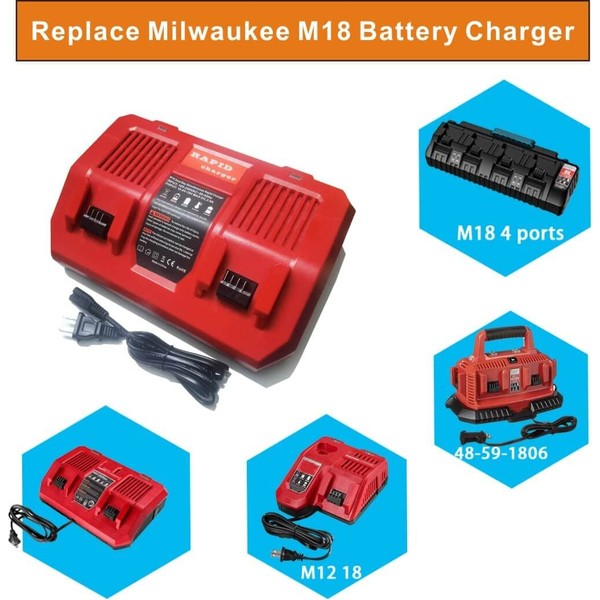
Milwaukee M18 & M12 Rapid Battery Charger (48-59-1808)
Best For: Fast, safe charging of M18 and M12 lithium packs
Est. Price: $75 - $95
"The industry standard fast charger for M18 packs, equipped with sophisticated diagnostic circuits that protect battery health."
- +Charges battery packs up to 40 percent faster than standard base chargers
- +REDLINK intelligence monitors cell temperatures to prevent thermal stress
- +Integrated wall-mount keyholes keep work surfaces completely clear
- -Generates audible cooling fan noise during high-speed charge cycles
- -Will correctly reject severely damaged or shorted lithium packs for safety
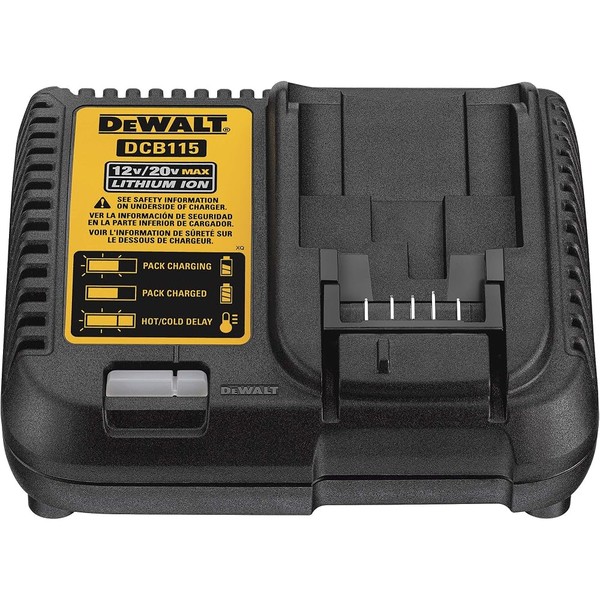
DeWalt DCB115 12V/20V Max Lithium-Ion Battery Charger
Best For: Maintaining DeWalt 20V Max tool batteries
Est. Price: $45 - $60
"The dependable workhorse charger that ensures DeWalt lithium packs receive correct, balanced charging currents."
- +Charges 2.0Ah packs in 30 minutes and 5.0Ah packs in 90 minutes
- +Diagnostic LED communicate charge status, hot/cold delay, and pack health
- +Compact wall-mountable footprint fits neatly above workbenches
- -Does not charge older 18V post-style stem batteries without factory adapter
- -Single-port design requires swapping batteries sequentially
Building a Safe Centralized Workshop Charging Station
Managing multiple cordless battery platforms safely requires a dedicated workspace electrical setup.
Consolidate all your tool chargers onto a dedicated charging shelf powered by clean subpanel circuits by following our wiring guide on wiring a serious garage workshop subpanel.
Keep high-torque cordless tools from stripping difficult fasteners by reviewing our extraction tips in how to remove a stripped bolt that is completely rounded off.

Hank Miller
Hank is a master craftsman and DIY mechanic based in Ohio. He tests workshop equipment, garage floor coatings, and power tools under brutal, real-world workshop conditions, with zero paid brand sponsorships.